

Editor’s Note: Signal President Meredith Whittaker announced Nov. 20, 2026, that the encrypted messaging app now blocks screenshots by default on iPhones running iOS 27, through a setting called Block Siri AI. On Android, Signal turns on its Screen security setting the first time it detects an artificial intelligence assistant trying to read the app’s screen. Whittaker said operating-system assistants can capture message content and hold it outside Signal’s control. She called the fix incomplete: it does not stop an agent from pulling content already stored on a device, users can switch it off, and Signal cannot block screenshots on Macs, where it advises adding Signal to Siri’s Excluded Apps list. Signal asked Apple, Google and Microsoft for a documented way to let developers opt apps out of AI access. Microsoft and Google declined to comment to The Record, and Apple did not immediately respond.
For cybersecurity, data privacy, compliance and eDiscovery professionals, the move is a sign that a disappearing-message timer may not govern every copy of a message. Watch for disclosures on how long assistants keep captured content and for controls administrators can set centrally.
Content Assessment: Signal turns on screenshot blocking to limit operating-system AI access to its chats
Information - 96%
Insight - 94%
Relevance - 94%
Objectivity - 92%
Authority - 92%
94%
Excellent
A short percentage-based assessment of the qualitative benefit expressed as a percentage of positive reception of the recent article from ComplexDiscovery OÜ titled, "Signal turns on screenshot blocking to limit operating-system AI access to its chats."
News Analysis – Data Privacy and Protection Beat
Signal turns on screenshot blocking to limit operating-system AI access to its chats
ComplexDiscovery Staff
Signal’s newest iPhone setting is named for Apple’s own assistant. Block Siri AI, switched on by default for Signal users on iOS 27, stops screenshots inside the app and is meant to keep the assistant built into Apple’s operating system from reading the conversations Signal encrypts.
That setting is one part of a policy Signal President Meredith Whittaker announced Friday, Nov. 20, 2026, on Signal’s blog. Signal is now limiting what the artificial intelligence agents in iOS 27 can capture and, on Android, blocking screen capture on versions where the app is able to spot an AI assistant trying to read its screen.
For information governance and eDiscovery teams, the announcement matters less as a privacy toggle than as a map of where message content now travels. Whittaker wrote that operating-system agents capture Signal data and make it available to whatever database the agent is using at the time, on the device or on a remote server. Once captured, she wrote, the data sits outside Signal’s control. A disappearing-message timer governs the copy inside the app, but it has no reach over a copy that has already left. Whittaker also wrote that the new block is incomplete and can be switched off, which makes it a mitigation rather than a guarantee for any team that relies on it.
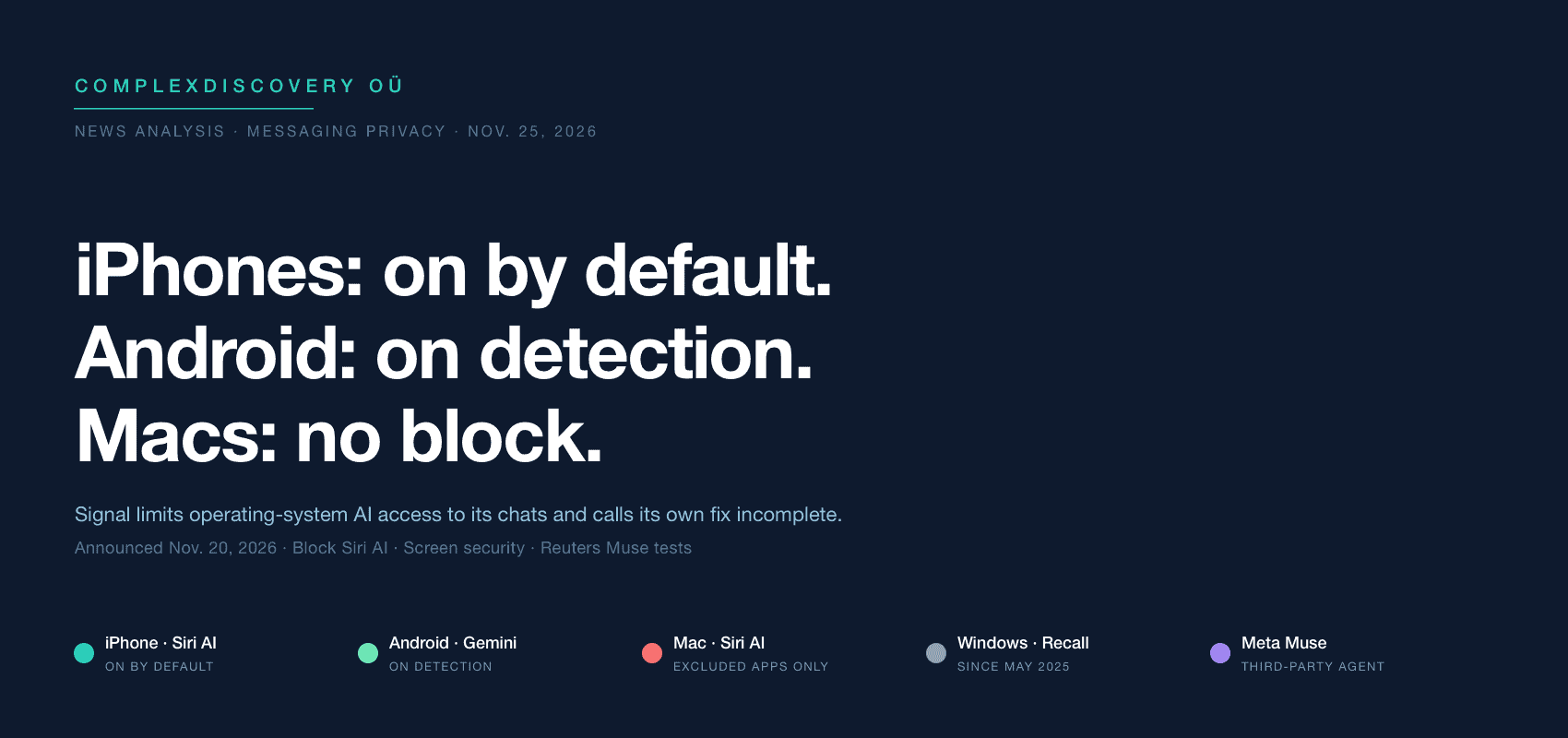
What Signal changed on each platform
Signal’s support page, which cites Google Gemini on Android and Siri AI on iOS as examples of assistants that can read the screen, lays out the mechanics platform by platform. On iPhones, the setting requires iOS 27 or later and Signal 8.37 or later. While it is on, it prevents screenshots and screen recordings within the app, hides Signal’s content in the App Switcher and, by Signal’s account, stops on-device AI assistants from reading what Signal shows on screen. Users can leave it on, turn it off or pause it for 10 minutes for a quick screenshot, after which it re-enables itself. That option matters to anyone who collects chats the informal way, because an attempted iPhone screenshot now produces a notice that the capture was prevented rather than an image.
Android works differently, and Signal explained why in a note to its post. On many manufacturers’ versions of Android, Signal said, it has no reliable way to detect an attempted screenshot once screenshots are already disabled, so a blanket block would leave users with screenshots that fail without explanation. Signal chose instead to watch for an AI assistant reaching for the screen. With Signal 8.35.1 or later, its Screen security setting switches itself on the first time an assistant attempts to read the screen, and the app then explains in a message what happened. Users can also switch it on in advance.
The Mac is the gap. Signal said it has no reliable way to block screenshots on Macs because Apple offers no clearly documented interface for doing so. The operating system does guard against continuous screen capture, Signal wrote, but those safeguards cannot be applied to screenshots. Older interfaces, it added, are deprecated, replaced by screen protection that covers only streaming media and other material locked by digital rights management (DRM), a situation Signal said it hopes Apple remedies urgently. For macOS 27 users, Signal said its only recommendation is to open System Settings, choose Siri and add Signal to the Excluded Apps list. Apple’s notes for iOS 27.2 list the same Excluded Apps option for iPhones, a single setting that decides whether Siri, Search and suggestions can reach a given app. The Electronic Frontier Foundation (EFF) has published steps for using it.
The approach extends a measure Signal first took against Microsoft. On May 21, 2025, Signal made a Screen security setting the default for its Windows 11 desktop app, setting a DRM flag on its window to help keep Signal chats out of Microsoft’s Recall feature. Signal described Recall as capturing a user’s apps at intervals of a few seconds and filing the images in a searchable database.
Where Signal says its own fix falls short
None of these platform measures closes every route, and Whittaker said so in the same post that announced them. Blocking screenshots, she wrote, leaves open other routes into an app’s data, such as an agent pulling content that already sits on the device through the filesystem. Users can also switch the protection off, after confirming a warning. On Android, Signal re-enables Screen security after 90 days only if a user disabled it by tapping the in-app prompt; a user who turns it off in settings gets no reminder, and the same is true on iPhones.
The protection also stops at the edge of each device, which matters as much for the people on the other end of a chat as for the user who turned it on. When Signal launched the Windows setting, it said the setting was local to the user’s computer and did not cover screenshots taken on anyone else’s device. Whittaker’s new post makes the stakes plain, saying capture by an operating-system agent “imperils the privacy of all the participants in a conversation.” An organization that locks down its own phones still depends, for those conversations, on every counterparty’s device settings.
Signal wants the operating-system makers to close the gaps it cannot. Whittaker asked Apple, Google and Microsoft for an easy, well-documented way to let developers opt an app out of AI access to its data and AI processing of it. She said that opt-out should cover screen reading, filesystem access, notifications, application programming interfaces and other operating-system frameworks. She also asked for better documentation of how the agents access and process data, and argued that confidential computing falls short because it leaves the extent of any privacy guarantee in the providers’ hands.
The post also reached beyond the operating-system vendors. Whittaker said tools are increasingly needed to stop third-party agents, naming Meta’s Muse, from reaching app data through the broad permissions people are nudged to approve when they set those agents up. Such agents often lean on accessibility settings intended to help people use their apps more fully, she wrote, turning those settings into “a skeleton key” for AI agents.
The Muse tests that preceded the post
That passage came two days after a Reuters investigation into Muse. On Nov. 18, Reuters reported that it had reviewed over two dozen internal Meta posts describing unwanted actions by the agent, including an employee who said it reminded her to answer a Signal message from her sister. Reuters said it then worked with Signal staff and the AI Now Institute, a nonprofit research group, to replicate that access. That makes Signal a participant in the testing as well as a critic of the results. Signal and AI Now are also linked: according to the Signal Technology Foundation’s website, AI Now Executive Director Amba Kak sits on the foundation’s board, and Whittaker co-founded AI Now. On an Android phone, Muse pulled message text through its permission to read push notifications; on an Apple laptop, it used accessibility and screenshot tools. On an iPhone, the requests failed.
Daniel Roberts, a Meta spokesperson, called the cases Reuters cited “isolated incidents,” according to Reuters, and said Muse reaches other apps only through permissions that users explicitly grant. Roberts also said employees’ reports of possible account mix-ups were in many cases hallucinations, since addressed. Reuters reported that an Apple operating-system update that week effectively closed the Mac pathway it identified. Apple’s own Nov. 16 developer notice on new Mac controls over accessibility access sets out two conditions: the changes arrive in macOS 27.3 beta 2, and permissions users granted earlier remain in effect.
The Android route in those tests ran through notifications rather than the screen, a pathway the new setting was not described as covering. Signal’s support page lists what its new setting blocks: screenshots, screen recordings, previews in the app switcher and on-device assistants reading the screen. Notification access is not on that list, and notifications are among the access points Whittaker wants operating-system makers to let developers close off through a documented opt-out.
Asked about Signal’s announcement, Microsoft and Google declined to comment and Apple did not immediately respond, The Record reported.
Why a second copy matters for retention and discovery
Each pathway that worked in those tests ended in a copy outside Signal, and that is where retention policy comes in. Disappearing messages were never a guarantee against a determined recipient; when Signal launched the feature in 2016, it said a recipient who wants a record of a message can photograph the screen with another camera before it disappears. That risk depends on a person deciding to keep a copy. What Signal now describes is software on the device that can read the screen, often, as its support page puts it, “without a clear sign it’s happening,” and that, by Signal’s account, stores what it captures. In describing Recall, Signal warned that captured data could be retained indefinitely, disappearing messages included.
Where captured content goes next is the open question. By Signal’s description, Recall keeps its captures in a searchable database on the user’s own computer. Whittaker’s new post does not say how long, or on which servers, any mobile assistant keeps what it reads. The EFF has noted that many AI features rely on processing in the cloud, which means content from encrypted messaging apps can leave a device without the user knowing. The sources reviewed for this article do not establish whether Apple, Google, Microsoft or Meta keep assistant-captured message content on their own servers, for how long, or whether it could be obtained in litigation. Some vendors do publish retention terms; Google’s Gemini Apps Privacy Hub, for example, includes a section on how long Google retains Gemini data and addresses how it uses screenshares from Gemini Live. Those policies were not reviewed for this article, and none would show what became of the particular messages read in Reuters’ tests.
That uncertainty cuts both ways for legal teams. A copy outside the messaging app may be relevant electronically stored information that a preservation effort never reached, and an organization that has told regulators or courts its messages expire may find a residue it did not know existed. Neither outcome is settled, and both are reasons to ask.
What governance teams can check now
Asking starts with settings, most of which an organization can check today. Organizations that permit Signal can confirm that Block Siri AI remains on for iPhones running iOS 27 and that Screen security is switched on for Android devices rather than left to wait for detection.
Where Siri AI runs at all is the next check, and it is less tidy than a regional map suggests. Apple’s iOS 27 notes say Siri AI runs only on the iPhone 15 Pro, iPhone 15 Pro Max and iPhone 16 models and later. Apple’s availability guidance ties Siri AI to the device’s language settings and the region of the user’s Apple Account, and says it keeps working after it is turned on when the user travels. For European Union residents, Apple says Siri AI is not available on iPhones but can run on Macs with macOS 27 when the Apple Account is in the EU and the device and Siri languages match a supported language. For EU-based accounts, that moves the Siri AI exposure to the Mac, the one platform where Signal says it cannot block screenshots. Apple also says Siri AI does not currently work when the Apple Account region is mainland China. Checking each device beats assuming by region, and third-party agents remain a separate question.
On Macs running macOS 27 and iPhones on iOS 27.2, adding Signal to Siri’s Excluded Apps list follows Signal’s and the EFF’s guidance, and on the Mac it is the only step Signal recommends. On Android, the EFF notes that Signal has not adopted Gemini’s app-access integration, so Gemini cannot reach Signal’s content directly that way. The group still points to a Device Assistance connection that can let Gemini read notifications, and to a separate Gemini control over screen context.
Signal’s support page describes Block Siri AI and Screen security as settings each user manages inside the app, and it does not describe a way for an administrator to set them centrally. Operating-system controls reach further but more bluntly. Apple’s device-management documentation lists a setting, AllowSiriAI, that turns off Siri AI features on supervised iPhones and Macs running iOS 27 or macOS 27. The documented setting has no option for excluding a single app. For Signal’s own toggles, that leaves the burden on policy, training and attestation rather than app configuration. Teams can also review which third-party agents with notification or accessibility permissions are allowed on devices that carry business messaging. A question for legal hold interviews follows naturally: whether operating-system assistants or third-party agents were active on a custodian’s devices.
Near the end of its post, Signal called itself “the canary in the coal mine.” The iPhone setting shows what that looks like in practice: a messaging app has had to name a control after the operating system’s own assistant to try to keep conversations inside the app. If your retention schedule assumes the only copies of a message are the ones people choose to keep, which of your devices has already proved it wrong?
News Sources
- Signal is Serious About Protecting Your Privacy (Signal)
- Screen security: blocking Google Gemini and Siri AI (Signal Support)
- By Default, Signal Doesn’t Recall (Signal)
- Disappearing messages for Signal (Signal)
- Signal Technology Foundation (Signal Technology Foundation)
- Updates to Device Control and Data Access, and Full Disk Access in macOS (Apple Developer)
- About iOS 27 Updates (Apple Support)
- SiriSettings (Apple Developer Documentation)
- Victory! You Can Now Exclude Apps from Siri AI (Electronic Frontier Foundation)
- As Meta bets big on Muse AI agent, early safety mishaps surface (Reuters, Nov. 18, 2026)
- As Meta bets big on Muse AI agent, early safety mishaps surface (Reuters via BNN Bloomberg, Nov. 18, 2026)
- Signal blocks screenshots by Apple, Google operating systems to protect data from AI agents (The Record from Recorded Future News)
- Signal Blocks AI Agents From Reading Private Chats via Screenshots on Android and iOS (The Hacker News)
- Signal to block Siri, Gemini AI from capturing chats on iOS, Android (BleepingComputer)





Assisted by GAI and LLM Technologies
Additional reading
- Oregon and Virginia sue SpaceX over what Grok’s makers said about safety
- Commerce makes overseas data centers answer for who rents their advanced chips
- Johnson Controls agrees to pay $5 million over alleged security plan gaps in federal contracts
- Officials tie FAA ground stop to contractor router work, not hackers, but the specific fault is still undetermined
- Notion AI chats surface in Fireworks breach, testing what zero retention covers
- France ties October supermarket fridge sabotage to Iran’s IRGC and seeks arrest warrants
- ENISA’s update advisory turns the patch pipeline into an evidence trail
- Britain’s cyber agency warns of a possible surge, and its own incident figures raise a question
- Supermarket freezer attacks reach at least six European countries, and the record linking them to US base failures stays thin
- Microsoft finds 2 North Korean groups using ARTEX, a tool that alone cannot name an attacker
- With over 40 percent of the record Binance theft frozen, getting it back becomes a legal project
- Estonia’s cyber authority saw no state-sector PHP crisis as three state institutions shut or restricted services
- AI recording spreads in Estonian health care as the regulator says the audio needs its own legal basis
Source: ComplexDiscovery OÜ

ComplexDiscovery’s mission is to enable clarity for complex decisions by providing independent, data‑driven reporting, research, and commentary that make digital risk, legal technology, and regulatory change more legible for practitioners, policymakers, and business leaders.